
Constructing a container
An image (more specifically the rootfs of an operating system) is needed to construct a container.
The building environment should be as follows,
concon
├── base
├── merged
├── upper
└── work
mkdir -p concon/{base,upper,work,merged}The rootfs should be in a folder as base whose siblings are upper, work, and merged.
baseis immutable right after getting a filesystem inside of it.upperreflects changes.mergemerges the upper as top, base as lower, and present as one.- Applications write to
merged(the mountpoint). The kernel intercepts the write, performs copy-up (from lower to upper if needed), then applies the write to upper. workis an internal kernel scratch area for atomic copy-up. it writes a temp file in workdir, then renames it into upperdir for atomicity.
cd concon
podman pull docker.io/almalinux/10-init
Trying to pull docker.io/almalinux/10-init:latest...
Getting image source signatures
Copying blob 1762172a5766 skipped: already exists
Copying config defe64aa76 done |
Writing manifest to image destination
defe64aa76a60a989666f479c14779cc3774ee00ee9c65c18a301543b76b30e2Now that the dir and sub dir for constructing a container is created, we will be using an almalinux image to construct it.
Podman can construct it easily but, we are going to do it ourselves, so let’s save the image as an archive (tar.gzip)
podman imagesREPOSITORY TAG IMAGE ID CREATED SIZE
docker.io/almalinux/10-init latest defe64aa76a6 3 weeks ago 595 MBpodman save docker.io/almalinux/10-init | gzip > alma.tar.gz
lsalma.tar.gz base merged upper workNow, take alma.tar.gz and extract it to the base dir
tar -xzf alma.tar.gz -C baseIt extracts the tar.gz to base dir (more specifically changes path to base before extraction).
Add -v for verbose mode.
tree -L 3 basebase
├── 45758bc998306897d5d45e82df6a85ff8841e8b84e9b229580a869453f6720bd.tar
├── 8dab7cd6f091a7660c97115a02f0673885863ff09df6284399e3fa3b758051a6
│ ├── json
│ ├── layer.tar -> ../45758bc998306897d5d45e82df6a85ff8841e8b84e9b229580a869453f6720bd.tar
│ └── VERSION
├── defe64aa76a60a989666f479c14779cc3774ee00ee9c65c18a301543b76b30e2.json
├── manifest.json
└── repositoriesIt should show the rootfs of the container but it doesn’t. The extracted content of the container image is pulled by podman which not just holds the rootfs but, does the required files and folders in a standard directories that satisfies the OCI-Standard.
Container images are created by stacking one layer on another but, here alma has a single layer because almalinux squashed all layers into a single layer.
When creating container images, following the same practice as alma is recommended.
Now, let’s move the contents of the base to a different dir as x-image and extract the filesystem of almalinux from the x-image’s contents to base.
mv base x-image
mkdir base
tar -xf x-image/*.tar -C base
ls base
afs bin dev etc home lib lib64 media mnt opt proc root run sbin srv sys tmp usr varNow it can be used to mount as an overlayfs to costruct the container environment.
OverlayFS is a linux union mount filesystem that can present a single merged directory by layering a lower directory and an upper directory.
Container base layer is immutable, therefor readonly.
Upper directory is where all changes reflected but
writing directly there would conflict with overlay’s philosophies,
therefore write on merged which the kernel takes, stages on work, and then atomically does to upper.
Create the filesystem of the container by mounting files as an overlayfs as follows,
sudo mount -t overlay overlay \
-o lowerdir=base,upperdir=upper,workdir=work merged
Now we can use unshare to carve out a new namespace for the container and chroot to give container the root as the root of the extracted almalinux.
sudo unshare \
--pid         \
--uts          \
--ipc           \
--net            \
--mount           \
--fork             \
chroot merged /bin/bash
It creates a new namespace that’s detached from host.
cat etc/os-release
echo "nameserver 1.1.1.1" > etc/resolv.conf
cat etc/resolv*
NAME="AlmaLinux"
VERSION="10.2 (Lavender Lion)"
RELEASE_TYPE=stable
ID="almalinux"
ID_LIKE="rhel centos fedora"
VERSION_ID="10.2"
PLATFORM_ID="platform:el10"
PRETTY_NAME="AlmaLinux 10.2 (Lavender Lion)"
ANSI_COLOR="0;34"
LOGO="fedora-logo-icon"
CPE_NAME="cpe:/o:almalinux:almalinux:10.2"
HOME_URL="https://almalinux.org/"
DOCUMENTATION_URL="https://wiki.almalinux.org/"
VENDOR_NAME="AlmaLinux"
VENDOR_URL="https://almalinux.org/"
BUG_REPORT_URL="https://bugs.almalinux.org/"
ALMALINUX_MANTISBT_PROJECT="AlmaLinux-10"
ALMALINUX_MANTISBT_PROJECT_VERSION="10.2"
REDHAT_SUPPORT_PRODUCT="AlmaLinux"
REDHAT_SUPPORT_PRODUCT_VERSION="10.2"
SUPPORT_END=2035-06-01
nameserver 1.1.1.1The root is changed to the extracted almalinux’s filesystem root, from there, etc is a child, and that’s why it worked without absolute path.
mount -t proc proc proc
ps ax
the first proc is the fs type, second’s what to mount, and third’s where to do
PID TTY      STAT   TIME COMMAND
  1 ?        S      0:00 /bin/sh
 27 ?        R+     0:00 ps ax
The network stack is unshared for the new namespace, so it can not tether to internet. Open a new terminal on host without closing the current terminal that is in the new namespace to add network stack.
ip -br link | awk '{print $1}'lo
eth0
virbr0On host OS, typically three net interfaces are found. io loopsback to localhost. second’s a wifi (might be ethernet for you). third’s for virtualization.
Let’s wireup a virtual ethernet pair.
sudo ip link add veth0 type veth peer name veth0-guest
ip -br link | awk '{print $1}'
lo
eth0
virbr0
veth0-guest@veth0
veth0@veth0-guestthe first one is self and the other is peer divided by @. Basically veth0-guest is peer to veth0 and vice versa the otherway also.
To give the new namespace an internet connection, the veth0 in host has to be binded with the veth0-guest inside of the namespace. It would be roughly as follows,
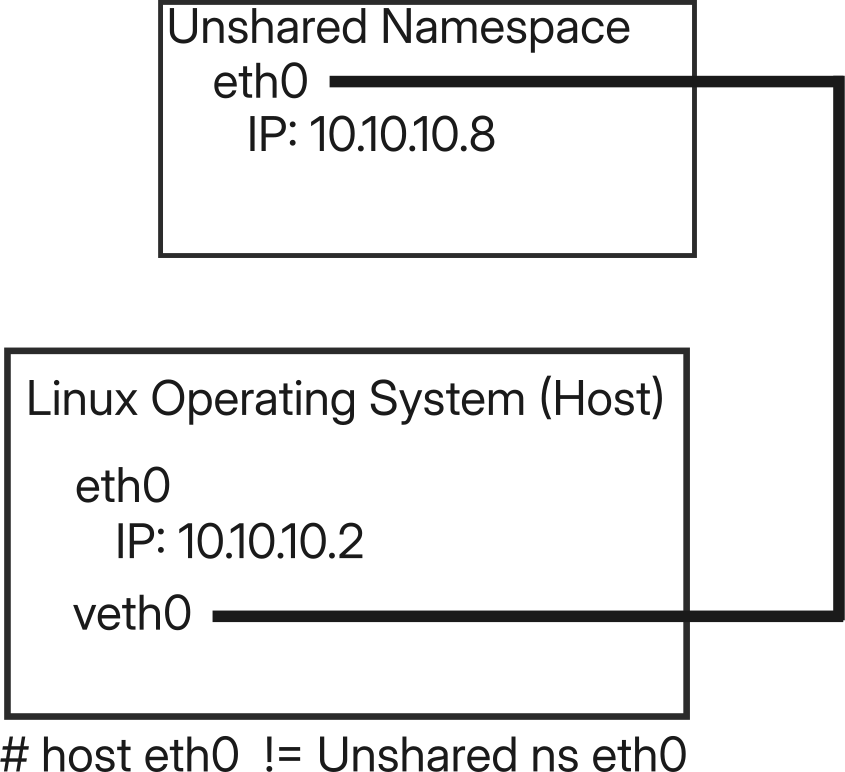
Look. Both the container (new namespace) and host has identical ethernet but the ethernet of the new ns is binded with a virtual eth of host and the veth0 gets its connection from host’s eth0.
To get this, a custom configuration in both side is required, so we can just omit it by not unsharing the --net. The new namespace would share host connection directly.
exit # to exit from current namespace (to host)sudo unshare \
--pid \
--uts \
--ipc \
`# --net` \
--mount \
--fork \
chroot merged /bin/bashdnf install nginx -yAlmaLinux 10 - AppStream 473 kB/s | 2.6 MB 00:05
AlmaLinux 10 - BaseOS 1.2 MB/s | 37 MB 00:30
AlmaLinux 10 - CRB 84 kB/s | 615 kB 00:07
AlmaLinux 10 - Extras 4.7 kB/s | 13 kB 00:02
Package nginx-2:1.26.3-6.el10_2.7.x86_64 is already installed.
Dependencies resolved.
Nothing to do.
Complete!With this understanding of container internals, you can now selectively expose or restrict access, depending on whether what requires is integration or isolation.